
Wiki | Nexus | Download | Wabbajack Discord | Jackify Issues | Legacy Guides | Ko-fi
Jackify - Technical Guide
For users who just want to use Jackify: See the User Guide for step-by-step instructions.
This technical guide provides more detailed information about Jackify's architecture, Steam integration, advanced features, and implementation details for those that are interested.
Steam Integration: The key to full automation
One of Jackify's most important features is the automated Steam integration. This allows the modlist install process on Linux to by automated end-to-end
What Jackify Does Automatically
When Jackify creates Steam shortcuts, it's not just adding a simple game entry. The process involves several sophisticated steps:
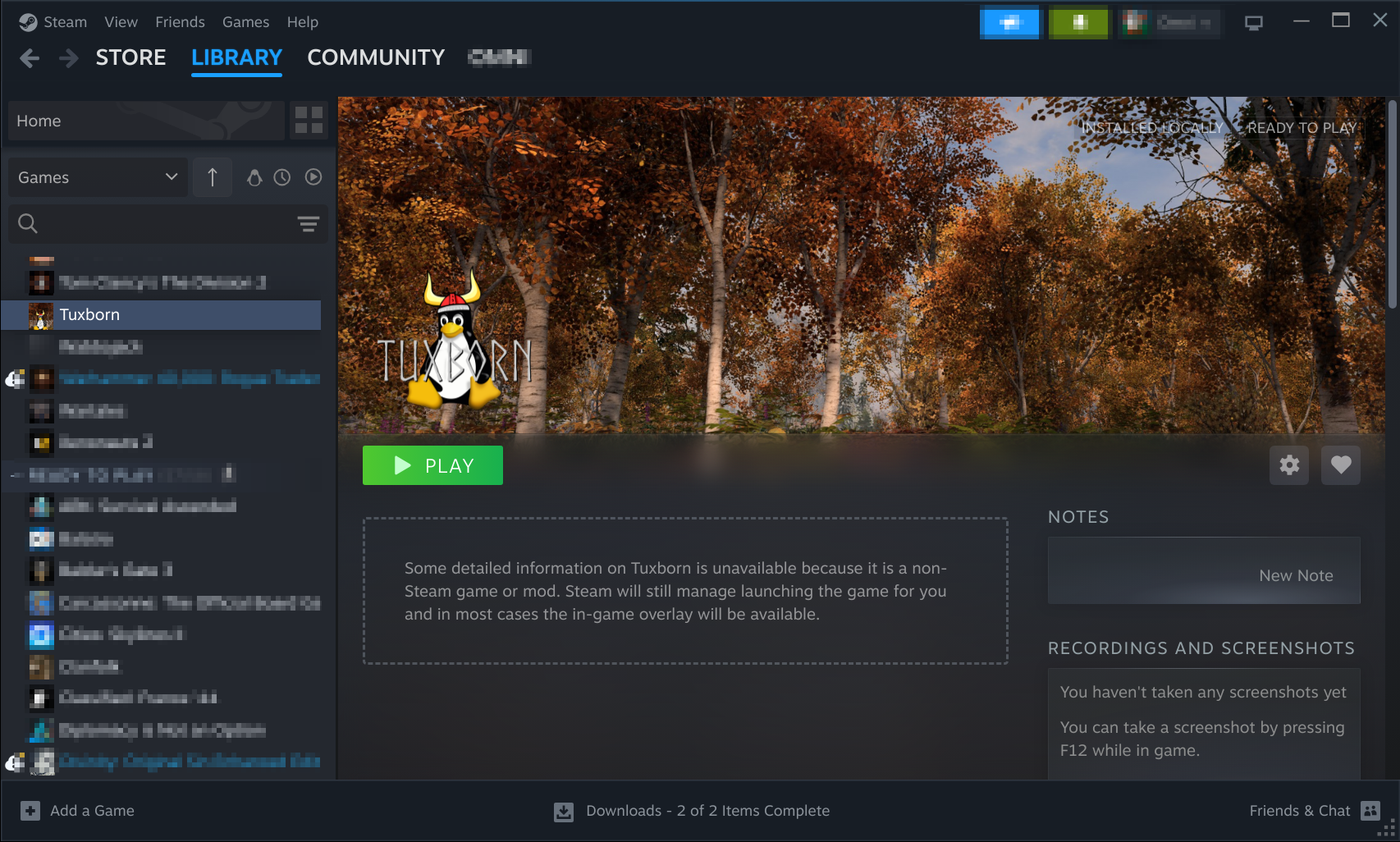
Steam library showing a newly created modlist shortcut with custom artwork, proper Proton configuration, and launch options - all configured automatically by Jackify
Behind the Scenes Process:
- Steam Shortcut Creation: Jackify creates non-Steam game entries with proper naming and categorization
- Proton Configuration: Appropriate Proton versions are selected and configured for each modlist
- Launch Options: Complex launch parameters are set to ensure proper modlist loading
- Compatibility Tools: Additional tools like protontricks configurations are applied
- Artwork Integration: Where available, custom artwork is downloaded and applied
- App ID Management: Stable App IDs are generated to ensure consistent behavior
Proton Version Selection
Jackify automatically selects appropriate Proton versions based on:
- Game requirements and known compatibility
- Modlist-specific needs (some modlists require specific Proton versions)
- Available Proton installations on your system
- Community testing and feedback
This eliminates the guesswork that plagued manual installations where choosing the wrong Proton version could cause subtle issues that were hard to diagnose.
Launch Option Automation
The launch options Jackify creates are carefully crafted to:
- Ensure proper modlist loading through ModOrganizer
- Set environment variables for optimal compatibility
- Configure wine prefixes and registry settings
- Handle game-specific quirks and requirements
These launch options replace what used to be complex startup scripts and manual configuration files.
Supported Games and Technical Details
Different games have different levels of support in Jackify, and understanding these differences helps set proper expectations for your modding experience.
Fully Supported Games
Skyrim Special Edition: The most mature implementation with extensive testing across dozens of popular modlists. Skyrim has the most modlists available and the most refined automation.
Fallout 4: Full automation including Creation Club content handling and F4SE integration. Fallout 4 modlists often include complex scripting that requires careful Wine configuration.
Fallout New Vegas: Includes special handling for Tale of Two Wastelands (TTW) installations, which combine Fallout 3 and New Vegas into a single game.
Enderal: The total conversion mod for Skyrim gets special treatment since it's technically a separate game with unique requirements.
Oblivion: Classic game support with modern tooling, including OBSE integration and compatibility with newer modding tools.
Download & Install Only Games
These games have basic installation support, but Steam integration is still being developed:
Starfield: Installation works perfectly, but some modlists may require manual Steam configuration until full automation is implemented.
Cyberpunk 2077: Basic support for popular modlists, with automation improvements planned based on community feedback.
Baldur's Gate 3: Installation support for the growing BG3 modding scene, with full automation coming as the modding tools mature.
Advanced Features and Configuration
Custom Modlist Support
Jackify isn't limited to official Wabbajack Gallery modlists. It also supports:
Community Modlists: Projects that are specifically designed for Linux users often have special optimizations and configurations.
Beta Modlists: Testing unreleased modlists or contributing to modlist development by installing work-in-progress versions.
Personal Projects: If you're developing your own modlists or customizing existing ones, Jackify can install and configure them.
Settings and Persistence
Jackify stores configuration in logical locations that respect Linux conventions:
User Settings (~/Jackify/): Your personal preferences, API keys, and default directories. This is backed up automatically before major operations.
Engine Configuration (~/.config/jackify/): Lower-level settings that control how the jackify-engine operates. Most users never need to modify these manually.
Modlist-Specific Configuration: Each modlist gets its own configuration directory with game-specific settings and Steam integration data.
Backup and Recovery
Jackify automatically creates backups before making significant changes:
- Steam shortcuts are backed up before modification
- Configuration files are versioned
- Installation progress is checkpointed for resumability
- Error recovery tools can restore previous working states
Migration from Manual Setup
If you're coming from manual Wabbajack installations (perhaps following older guides), Jackify can help modernize your setup while preserving your existing installations.
Assessment: What You Have vs. What You Need
Before migrating, it's worth understanding what manual installations typically lack:
- Proper Steam integration with correct Proton settings
- Consistent launch options and environment variables
- Automated backup and recovery systems
- Easy reconfiguration when system updates break things
The Migration Process
Jackify's migration process is designed to be non-destructive - it analyzes your existing setup and adds proper Steam integration without breaking what already works.
Step 1: Using "Configure an Existing Modlist"
Start with Jackify's existing modlist configuration to survey what you have:
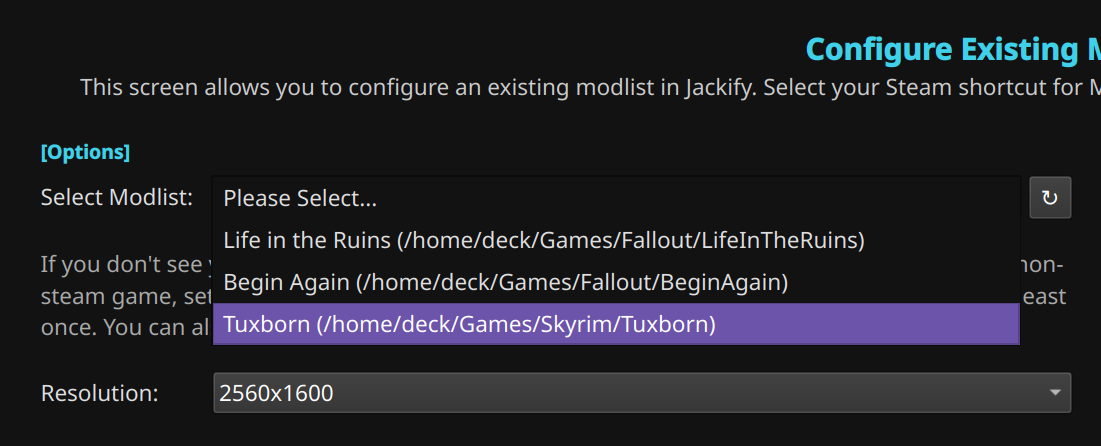
Jackify can detect and analyze existing modlist installations, even those created manually
This step involves pointing Jackify to your existing modlist directory. Jackify will analyze the installation and determine what kind of Steam integration is needed.
Step 2: Directory Analysis and Validation
Jackify examines your installation to understand its structure and requirements:
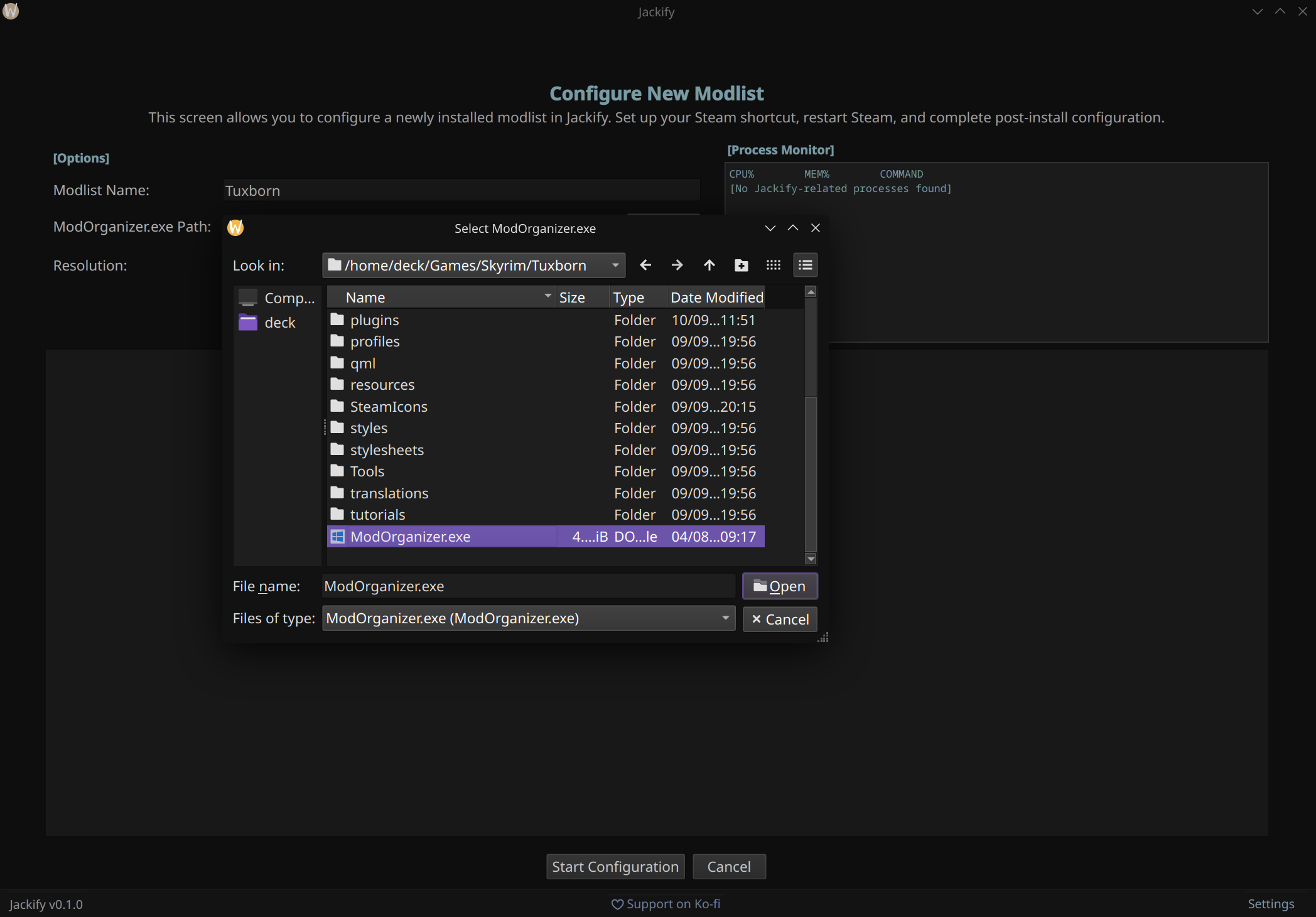
The directory browser helps locate existing installations and validates their compatibility with automated configuration
What Jackify Looks For:
- ModOrganizer.exe and its configuration
- Game installations and their versions
- Existing mod installations and load orders
- Wine prefix configurations (if any)
- Steam shortcuts that might conflict
Step 3: Configuration Analysis and Planning
Once Jackify understands your installation, it shows you what it plans to do:
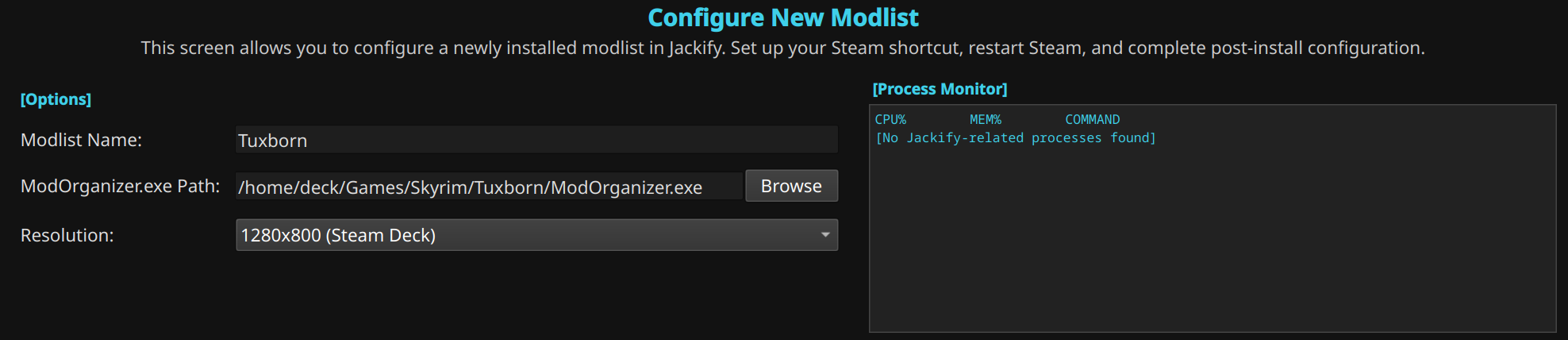
Jackify analyzes existing installations and shows exactly what it will configure, giving you control over the process
This gives you a chance to review and approve changes before they're made. Jackify shows:
- What Steam shortcuts will be created or modified
- What Proton settings will be applied
- What launch options will be configured
- What backup operations will be performed
Step 4: Verification and Success
After configuration completes, Jackify confirms that everything is working properly:
<SCREENSHOT_REQUIRED> Screenshot: Success dialog showing completed configuration and Steam shortcut creation </SCREENSHOT_REQUIRED>
Note
: This screenshot will be added once the current modlist installation completes
Benefits of Migration
Moving from manual setup to Jackify-managed installations provides several advantages:
Simplified Workflow: No more remembering complex command sequences or hunting for configuration files scattered across your system.
Better Error Handling: When things break (and they sometimes do after system updates), Jackify provides clear error messages and automated recovery options.
Automatic Updates: Jackify handles engine updates and configuration changes automatically, so you don't need to manually update scripts and configurations.
Professional Interface: Whether you prefer GUI or CLI, Jackify provides modern interfaces instead of relying on community scripts of varying quality.
Consistency: All your modlists use the same configuration approach, making troubleshooting and management much easier.
Advanced Usage and Power User Features
Automation and Scripting
While Jackify's GUI is designed for interactive use, the CLI interface supports automation scenarios:
Batch Installation: Install multiple modlists sequentially using configuration files or scripts.
Remote Management: Manage modlist installations on remote systems via SSH using the CLI interface.
Configuration Templates: Create standardized configurations for common setups and reuse them across multiple installations.
Custom Configurations
Advanced users can customize Jackify's behavior through configuration files:
Game-Specific Settings: Override default Proton versions, launch options, or compatibility settings for specific games or modlists.
Directory Templates: Create standardized directory structures that match your preferred organization scheme.
Integration Hooks: Add custom scripts that run before or after installation steps for specialized setups.
Development and Testing
If you're involved in modlist development or want to contribute to the Linux modding community:
Beta Testing: Install and test unreleased modlists to provide feedback to modlist authors.
Performance Profiling: Use Jackify's detailed logging to identify performance bottlenecks in modlists or configurations.
Configuration Sharing: Export working configurations to share with other users or contribute to community knowledge.
Architecture and Implementation
Core Components
Backend Services: Python service layer with modular handlers for different operations
modlist_service.py: Primary orchestrator for modlist operationsapi_key_service.py: Nexus Mods API key managementresolution_service.py: Display configuration handlingprotontricks_detection_service.py: Compatibility tool detection
Frontend Interfaces: Dual interface system
- GUI: PySide6/PyQt6 interface for interactive use
- CLI: Interactive text-based interface for automation and remote access
Engine Integration: Native jackify-engine 0.3.0 binary
- Optimized for Linux performance
- Handles core modlist processing
- No Wine/Proton dependencies for the engine itself
Configuration Management
User Settings (~/Jackify/):
- Personal preferences and API keys
- Default directory configurations
- Encrypted storage for sensitive data
Engine Configuration (~/.config/jackify/):
- Low-level engine settings
- Performance and compatibility options
- Debug and logging configurations
Modlist-Specific Data:
- Game-specific settings per installation
- Steam integration metadata
- Backup and recovery information
Error Handling and Recovery
Automatic Backups: Created before significant operations
- Steam shortcut configurations
- User settings and preferences
- Installation progress checkpoints
Error Recovery: Tools to restore previous working states
- Rollback mechanisms for failed installations
- Configuration restoration from backups
- Process cleanup and resource management
The Road Ahead: Future Plans and Development
Upcoming Features
Jackify is actively developed with regular updates planned:
Expanded Game Support: Additional games are being added based on community demand and modding ecosystem maturity.
Enhanced Automation: More aspects of modlist management will be automated, reducing the need for manual intervention.
Performance Improvements: Faster installation and configuration through optimized download strategies and parallel processing.
Community Features: Better integration with modlist communities, including rating systems and user reviews.
Community Involvement
The Linux modding community has always been collaborative, and Jackify continues this tradition:
Feedback and Testing: User feedback drives development priorities and helps identify issues across different system configurations.
Documentation: Community contributions to documentation help new users get started and document edge cases.
Modlist Compatibility: Working with modlist authors to ensure their projects work well on Linux through Jackify.
Supporting the Project
Jackify represents hundreds of hours of development work, testing, and community engagement. If you find it useful, there are several ways to support continued development:
Use and Provide Feedback: The most valuable contribution is using Jackify and reporting issues, suggesting improvements, and sharing your experiences.
Community Support: Help other users in Discord channels, forums, and GitHub discussions. Your experience can save others hours of troubleshooting.
Documentation: Contribute to documentation, write guides, or create video tutorials that help newcomers.
Code Contributions: For developers, contributing code, bug fixes, or new features helps improve Jackify for everyone.
Financial Support: If Jackify saves you time and effort, consider supporting development through Ko-fi or similar platforms.
Spread the Word: Star the GitHub repository, share with other Linux gamers, and help grow the community.
For step-by-step usage instructions, see the User Guide.